
Bexus Systems × Burchills
Many ways to order.
One connected business.
How Bexus Systems is helping a local produce business connect its online shop, order handling, buying and customer communications.
Why this project
Many ways in.
One person holding it together.
Orders arrive through the website, by email, on WhatsApp and by phone, and they change during the day. Every channel worked on its own. What was missing was the join: the only place the shop, the messages, the order sheet and the buying decision came together was in somebody’s head.
01 / Meet Burchills
A local business.
A familiar face.
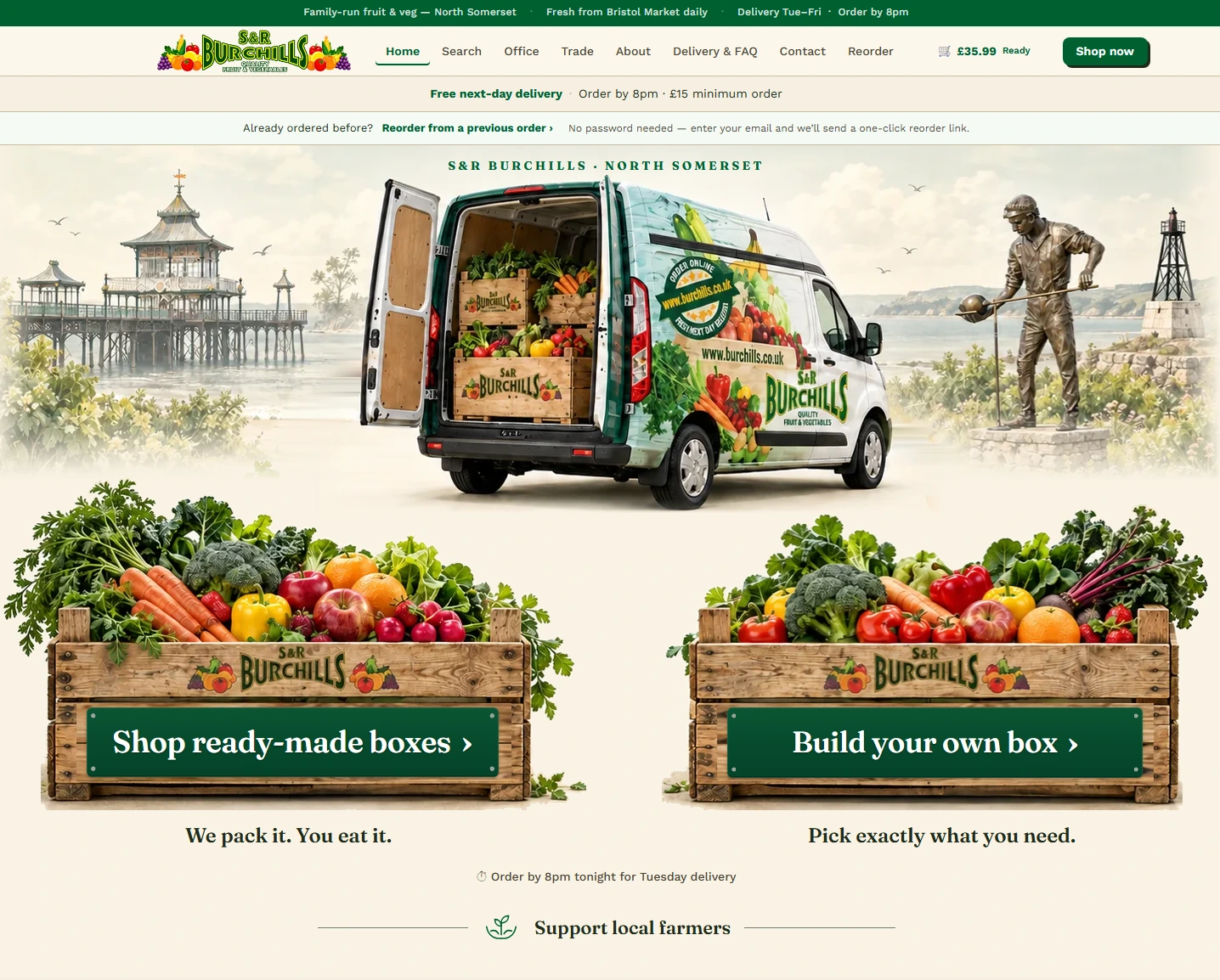
The customer journey starts with Burchills’ own identity: local landmarks, the delivery van and fresh produce. Customers can choose a ready-made box or build their own.
02 / Control the shop
What customers see.
What staff control.
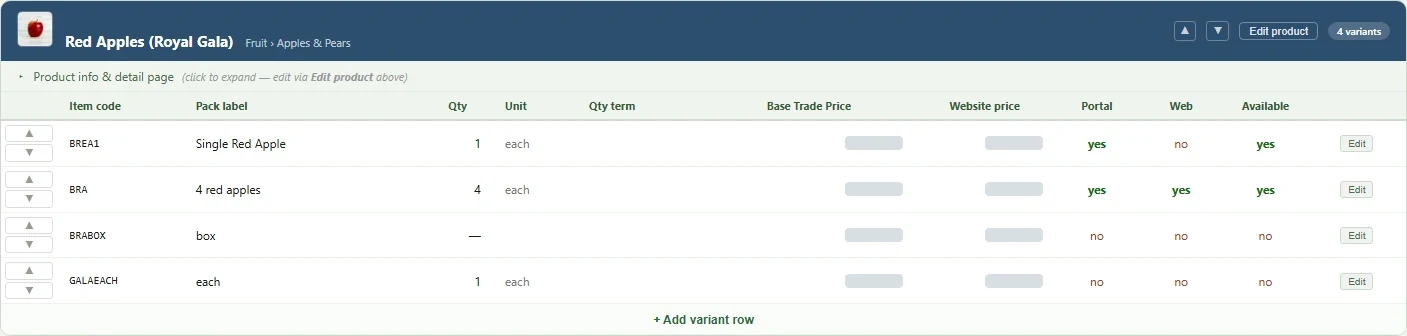
The catalogue brings product variants, pack sizes, prices, channel visibility and availability into one editing view. Different ways of selling a product can sit under the same product family.
03 / Bring orders together
Keep the request.
Review the interpretation.
Customers do not all order in the same way. Email, WhatsApp, phone and website orders arrive in one place, and each one keeps the customer’s original wording beside the catalogue lines the software suggests.
Keep the request.
The customer’s own words stay with the order, so nothing is lost in re-typing.
Suggest the lines.
Products, quantities and units are matched to the catalogue as a starting point.
Staff confirm.
Staff check the suggested lines, correct anything that does not match, and confirm the order before it is picked.
04 / Prepare each delivery
See the box.
And everything inside it.
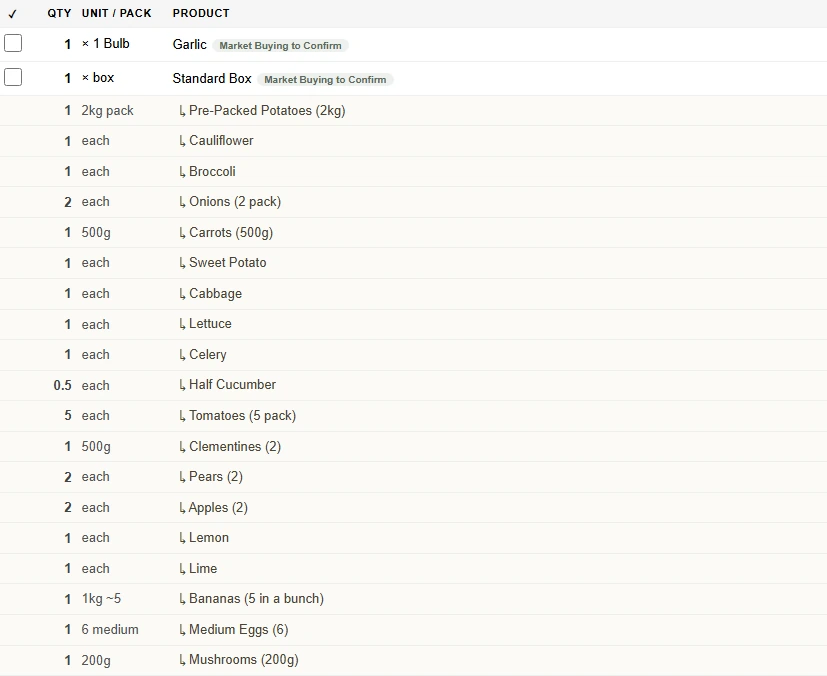
A box is one item to the customer, but many items to the person packing it. The picking view expands the contents so staff can see the individual products and quantities.
05 / Combine demand
One buying list, built from orders across your business.
See combined demand, check quantities that need attention, and prepare the market order.
Illustrative buying-list view · example data
Combined buying list
Tuesday delivery
7 products 6 ready 1 to review
Needs review 1
Bananas
- Total ordered
- 18 kg + 12 each
- Buying quantity
- Not converted
- Status
- Review
Why it needs review
- Website 6 kg
- Email 12 kg
- Phone 12 each
Twelve bananas were ordered by count, and no average weight is set for them, so they are not converted into kilos. Confirm a weight, or buy the counted bananas separately.
Ready to order 6
Carrots
- Total ordered
- 42 kg
- Buying quantity
- 3 × 15 kg sack
- Status
- Ready
Order sources
- Website 9 kg
- Email 21 kg
- WhatsApp 12 kg
Red onions
- Total ordered
- 20 kg
- Buying quantity
- 1 × 20 kg sack
- Status
- Ready
Order sources
- Website 8 kg
- Phone 12 kg
Broccoli
- Total ordered
- 36 each
- Buying quantity
- 3 × box of 12
- Status
- Ready
Order sources
- Website 10 each
- Email 14 each
- WhatsApp 12 each
Iceberg lettuce
- Total ordered
- 24 each
- Buying quantity
- 2 × box of 12
- Status
- Ready
Order sources
- Website 6 each
- Phone 18 each
Cherry tomatoes
- Total ordered
- 30 punnets
- Buying quantity
- 3 × tray of 10
- Status
- Ready
Order sources
- Website 14 punnets
- Email 16 punnets
Lemons
- Total ordered
- 75 each
- Buying quantity
- Approx. 1 box
- Status
- Ready
Sources and estimate
- Email 45 each
- WhatsApp 30 each
A box holds about 80 lemons, depending on fruit size, so the box count is an estimate.
See the source.
Expand a line to see which channels the demand came from.
Bring it together.
Combined quantities support the buying decision.
Keep exceptions visible.
Mixed units and unconfirmed pack sizes are flagged for review, never silently converted.
06 / Encourage repeat orders
A reason to return.
A message that feels familiar.
Create a coupon, select it for a campaign, edit the message and preview the branded email before it is sent. The illustration below follows a fictional campaign from offer to preview.
Illustrative example · fictional campaign
-
01 Create an offer
- Code
- WELCOME10
- Discount
- 10% off
- Minimum order
- £20
- Valid for
- 14 days after sending
-
02 Choose it for a campaign
- Campaign
- Welcome back offer
- Subject
- A little thank you from Example Greengrocer
- Sender
- Example Greengrocer
- Reply-to
- hello@example.com
-
03 Write the message
- Headline
- Thank you for ordering with us
- Message
- Fresh fruit and veg, delivered locally. Here’s 10% off your next order.
- Button
- Order online
04 Check the preview
Thank you for ordering with us
Fresh fruit and veg, delivered locally. Here’s 10% off your next order.
Unsubscribe · Example Greengrocer
The illustration demonstrates campaign preparation and preview. It does not establish email delivery performance or measured sales impact.
Where it is now
In everyday use.
Still being shaped.
Burchills uses the system day to day, and it is extended in short cycles with the people who work in it. No performance figures are published here, deliberately: work that is still changing is not a results claim. Measurements will appear only once they have been taken properly and Burchills is happy for them to be public.
07 / Start a conversation
Where is your team entering
the same information twice?
Bring the process, the workarounds and the awkward bits.
We’ll work out a useful first step together.
Selected interface details from the Burchills project. The buying list in chapter 05 and the campaign in chapter 06 are illustrations with fictional example data. Features continue to develop with the business.